


GPS Forex Robot 3 is a recovery-style expert advisor for MetaTrader 4, built by Mark Larsen and sold for $149 as a one-time licence. It trades the majors, mostly EURUSD, EURGBP and USDCHF, and it is a free download here.
Two things changed recently, and most reviews of this robot have not caught up with either. The company behind it has shut down. And the track records it was sold on, which are still the first thing you see when you search for it, tell a very different story from the headline everyone quotes.
Key Takeaways
- Free MT4 recovery robot for the majors, originally a $149 commercial system by Mark Larsen
- The vendor shut down in 2026, so there is no support, no updates and no guarantee
- Verified records show 1.21% to 2.21% a month, not the 30% the sales page promised
- The deepest drawdown on the best-documented account was 30.79%
- Every published record stopped updating between 2017 and 2020
- Performs best in ranging markets and struggles in strong sustained trends
Is GPS Forex Robot Still Supported in 2026?
No. We loaded the vendor’s site, gpsforexrobot.com, on 26 September 2026 and it returns a registrar notice saying the domain registration has expired. Checking the Wayback Machine, the last normal capture of the site is 19 March 2026, and by 23 August 2026 the address only redirects. On that final live capture the buy button already read SOLD OUT.
So there is no support desk, no version updates, and the 60-day money-back guarantee that was advertised alongside the $149 licence does not exist any more. That does not stop the EA running, because it is a compiled MT4 file and it will keep loading on your terminal. It does mean nobody is maintaining it against broker changes, and nobody is answering questions about it.
- Trading The EURUSD, EURGBP, GBPUSD and USDCHF Pairs
- Less Than A 9% Drawdown
- $8,000 Deposited On Apr 15, 2010
- Current Balance More Than $217,547

- Trading The EURUSD, EURGBP and USDCHF Pairs
- Really Small Drawdown
- $250 Deposited On Feb 15, 2010
- Current Balance More Than $3,700

- Trading The EURUSD Pair
- Really Small Drawdown
- $100,000 Deposited On May 21, 2012
- Current Balance More Than $600,000
How GPS Forex Robot Works
GPS Forex Robot is one of the longer-running commercial forex robots, originally built by Mark Larsen and team for MetaTrader 4. It trades the major pairs and leans on a recovery approach: when a trade moves into loss, the EA manages the position back toward breakeven rather than taking the loss immediately. That style does well in ranging, mean-reverting conditions, which is where most of its historical results came from.
The trade-off is the same as any recovery system. A strong, sustained trend against an open position is the hard case, because the recovery logic needs price to come back. Understanding that single fact tells you most of what you need to know about when this robot is comfortable and when it is not.
What GPS Forex Robot 3 Actually Returned
The sales page promised over 30% a month. The same vendor published account widgets to back the robot up, and those widgets are still on this page further down. They do not say 30%. Here is every record the vendor put its name to, with the date each one stopped.
| Account | Per month | Max drawdown | Total gain | Last updated |
|---|---|---|---|---|
| FX Choice, real USD, track record verified by Myfxbook | 1.21% | 30.79% | +227.4% on $50,000 | chart runs to about 2020 |
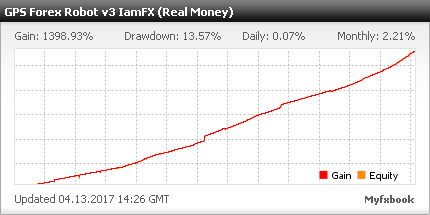
| Version 3 at IamFX, real money, Myfxbook | 2.21% | 13.57% | 1,398.93% | 13 April 2017 |
| FxChoice 100k balance chart, verified by Myfxbook | not stated | not stated | $100,000 to roughly $600,000 | 25 May 2020 |
| Alpari real money widget | not stated | not stated | $8,000 to $225,547 | stamped “Jul 26” with no year |
Two things fall out of that table. The verified rate of return is somewhere between 1% and 2.2% a month, not 30, and the gap between those two numbers is the whole marketing story. And the newest verified figure on this robot is about six years old, so none of it reflects current spreads, current volatility, or your broker.
The drawdown is the number worth sitting with. A 30.79% maximum drawdown on the best-documented account means that at its worst point, that account was down close to a third. On a recovery system that is not a surprise, it is the mechanism working as designed, and it is the risk you are accepting when you run it.
Settings and Risk
- Start on the pairs and timeframe the EA was tuned for, and keep the default risk low until you have weeks of demo data.
- Use a sensible maximum lot and an account balance that can absorb a recovery sequence without running out of margin.
- Pause it around major news when spreads widen and trends run.
- Demo it on your live broker first; spread and execution change recovery results more than most settings.
Recommendations
- Minimum account balance of 10000$ or equivalent cent account(100$).
- Work Best on EURUSD, EURGBP, USDCHF.
- Any Timeframe.
- To reach stable results, This GPS Forex Robot should work 24/7 on VPS. So we Recommend running this free forex EA on a reliable VPS (Reliable and Trusted FOREX VPS – FXVM)
- Low Spread ECN account is also recommended (Find the Perfect Broker For You Here)
- Recommend experimenting with this EA and fine-tuning it.

GPS Forex Robot EA
A free MT4 recovery-style forex robot for the major pairs, originally a paid commercial system by Mark Larsen.
Pros
- Free MT4 download of a well-known commercial robot
- Recovery logic suits ranging markets
- Trades the major pairs automatically
- Adjustable risk and lot settings
- Long history of public discussion to learn from
Cons
- Recovery style struggles in strong sustained trends
- Needs adequate margin to survive a recovery sequence
- Older robot, market conditions have changed since release
- No guaranteed live performance; backtests over-fit easily
Summary
A free MT4 download of a long-running commercial robot. Its recovery approach handles ranging markets well but needs enough margin to survive a losing sequence and struggles in strong trends. Used with small lots on a low-spread broker and tested on demo, it is a reasonable robot to study; treat old backtests as indicative only.
 Built by ForexCrackedWe tested 1,200+ indicators. Then we built our own.Six years of reviewing EAs and indicators went into FXC Fusion: two engines, the seven-panel cockpit, MT4 and MT5, from the team behind this site.
- Read More Auto Millions EA – [Cost $99]- For FREE
Frequently Asked Questions
Conclusion
GPS Forex Robot is worth studying as a free, well-documented recovery robot, provided you respect its one weakness: strong trends. Run it on a low-spread account with conservative lots and enough margin to survive a recovery sequence, and treat its old backtests as indicative rather than a promise of live results.
Related robots: if the recovery approach is what interests you, Recovery Manager EA works on the same idea and is still maintained, and Odin Forex Robot is the closest comparison from the same era. For a robot where we published a full tick-level backtest next to the live signal, see our Quantum Bitcoin EA review. Poverty Scalper Robot is the most downloaded free EA on this site. Browse the rest in the Forex Robot and Grid EA collections, or the full Forex EA library.


Discussion 20 comments
Is this still working?
Plz Repiar This Link
DOWNLOAD LINK NOT WORKING
In which time frame can it be used ??
I have copy both Expert and Libraries Folders into the respective MT4 Files.. But it doesn’t work, the dialog box doesnt even appear when I drag it to the MT4 Charts..
Please add v3
I’M using this EA and it works good for me the only Thing I see is that putting it from 0.01 to 0.02 or 0.05 it don’t work it puts trades on at 0.01 still.
been using it on all 3 Currency Pears and works good only been getting 3 trades a day and all make money have not lost anything to date.
you also need to go to inputs and remove 1000 max lots and put it to 10 or less it will not blow your account at 08.10.2020 can you fix the lots so i can put more then 0.01 in there as it don’t work when I put more on there a part from that works really good making money but not a lot on 0.01
how did you get the ai to work? i have the smiley face and auto trading is pressed. is there a step i’m missing?
add the libraries
how do i add the libraries, please?
what’s lot you put in there instead of 0.01?
I changed the lots to 0.1 and then 0.2 and ran tests and these lots worked
Anyone used the cracked file ?
Apparently it does not work in real account to test it.
I have put the libraries on their site and it does not work.
The files end in _edu.ext4, it doesn’t really work in a real account: S?
Could you please help me ?
On the other hand, in backtesting it shows very good results, just need to try it!
Which Version is this?
put it in EURUSD and will blow your account at 19.04.2020
witch version is this one?
Hack it please
Which Version is this?
This EA has a very dangerous martingale strategy when it loses a trade, opening a trade 10x the size in the opposite direction. Can break your account.
look at his monthly profit. very suspecious. 1 month with a very high profit and the rest very low. i really dont recommend this ea